soc-ai
soc-ai reads the alerts on your Security Onion grid. It triages them with a large language model that you host yourself. For each alert it pulls the related events, and it checks what else the host has done. It runs the indicators against local threat intel. It decodes the packets from the sensor if the payload matters. Then it gives you a verdict, a confidence number, and the reasoning behind them. Onion AI needs a Security Onion Pro license. soc-ai is an open alternative to it.
The model runs on your own hardware behind a LiteLLM gateway. No data about your network leaves it. The agent recommends each write-back, and you execute it. One exception exists. soc-ai can auto-acknowledge a high-confidence, low-stakes, investigated false positive, and it audits that write. The exception is off until you turn it on.
An optional cloud Oracle gives a second opinion on a hard alert. The Oracle is off until you turn it on, and soc-ai sanitizes its input first.
Note
Security Onion Solutions, LLC has no affiliation with soc-ai and does not endorse it. soc-ai is a separate service. It reads a grid that you already run.
The console
-
The console
The console at
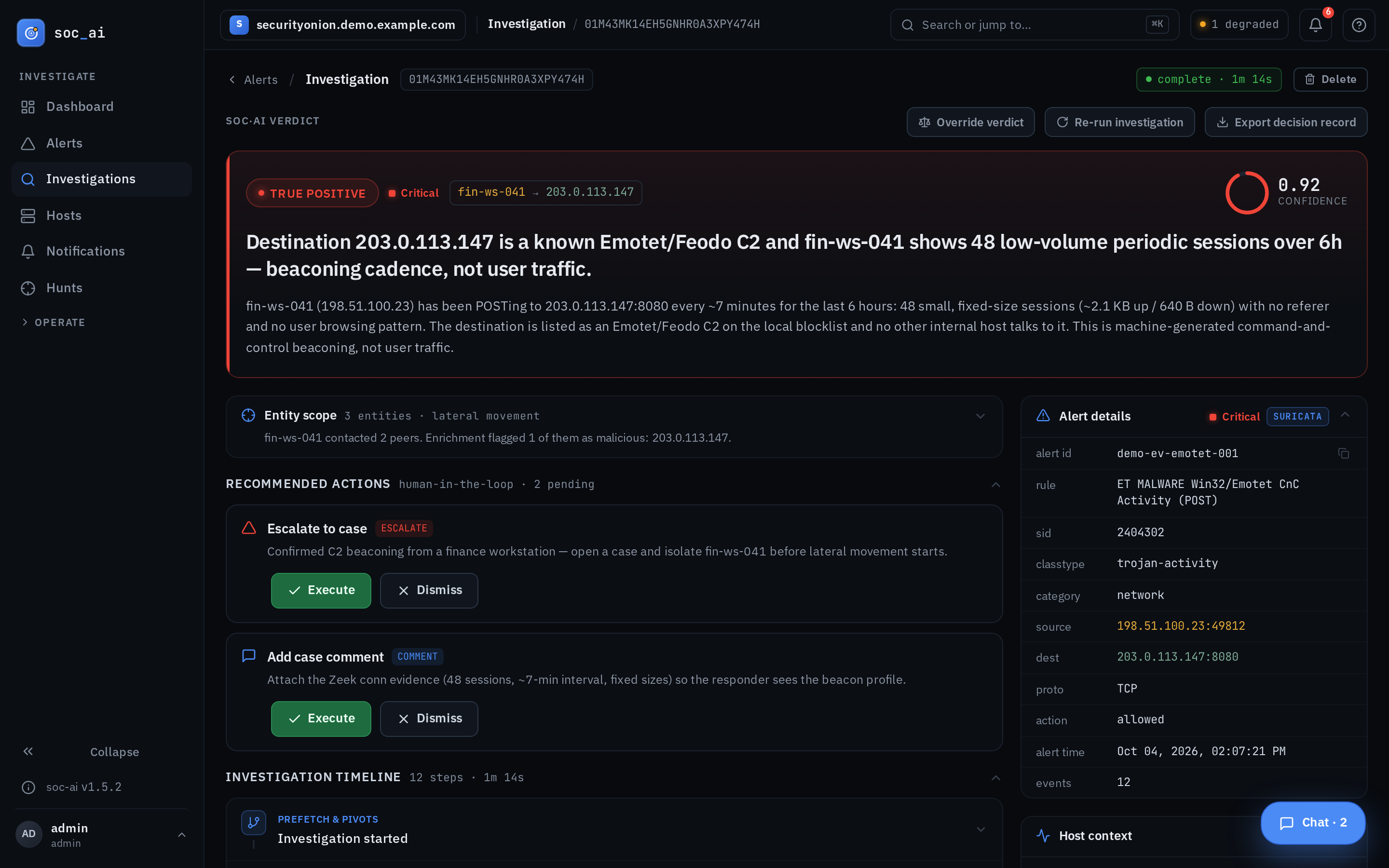
/appshows your alert queue grouped by rule. Each row carries the verdict and the confidence. Open an alert to investigate it. Use auto-triage to sweep the whole untriaged queue. Every investigation has a permalink that you can share.The Dashboard carries an assistant that answers questions about your grid in one turn. It uses the same read-only tools. Ask it which datasets you have, or which rule was noisiest overnight. If a question needs a sweep, the assistant writes the hunt objective and waits for you to confirm it.
soc-ai runs a read-only agent. For one alert it does this:
- It reads the alert context, the related events and the recent alert history of the host. It queries the events with OQL.
- It enriches the indicators against on-disk threat intel: blocklists, GeoIP and ASN data, and cloud-prefix tagging.
- It pulls and decodes raw PCAP from the sensor if the payload matters.
- It weighs the evidence and writes a verdict with a confidence and a rationale.
- It recommends the write actions for you to run with one click: acknowledge, escalate to a case, and comment.
The agent grounds each verdict in the runbooks of your own team. A runbook records what is normal on your network, which hosts are known-benign, and how you triage each class of alert. The console guide covers the Runbooks screen and the starter pack.
See what the agent can do for the full tool surface and its guardrails.
Hunts
Some questions cover more than one detection. "Is anything beaconing to a rare external IP?" "Are the domain controllers seeing credential-abuse lockouts?" "APT-X uses technique Y. Does it appear here?" A hunt takes an objective in plain English. It runs the same read-only agent across many hosts and a time window. It returns findings and a narrative mapped to MITRE ATT&CK. Start a hunt from the Hunts page, from an alert group, or on a schedule.
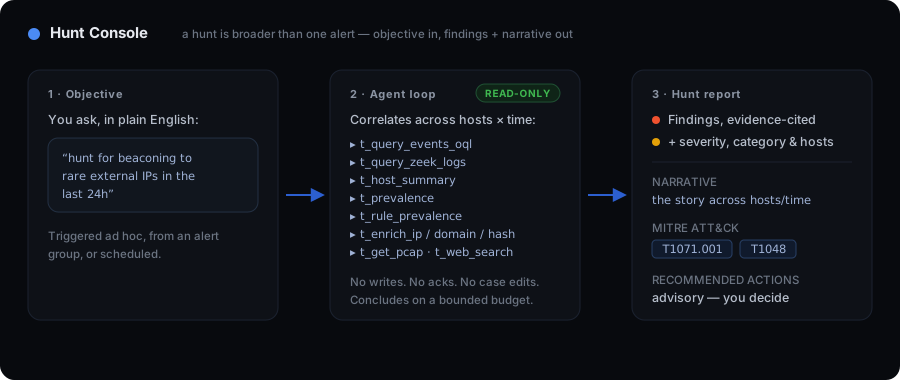
A hunt follows the same safety model as an investigation. A hunt is read-only. The agent queries and correlates. It never acknowledges an alert, escalates one, or edits a case. It runs on a bounded budget and reports what it found. If the budget stops it early, it still writes a grounded partial report.
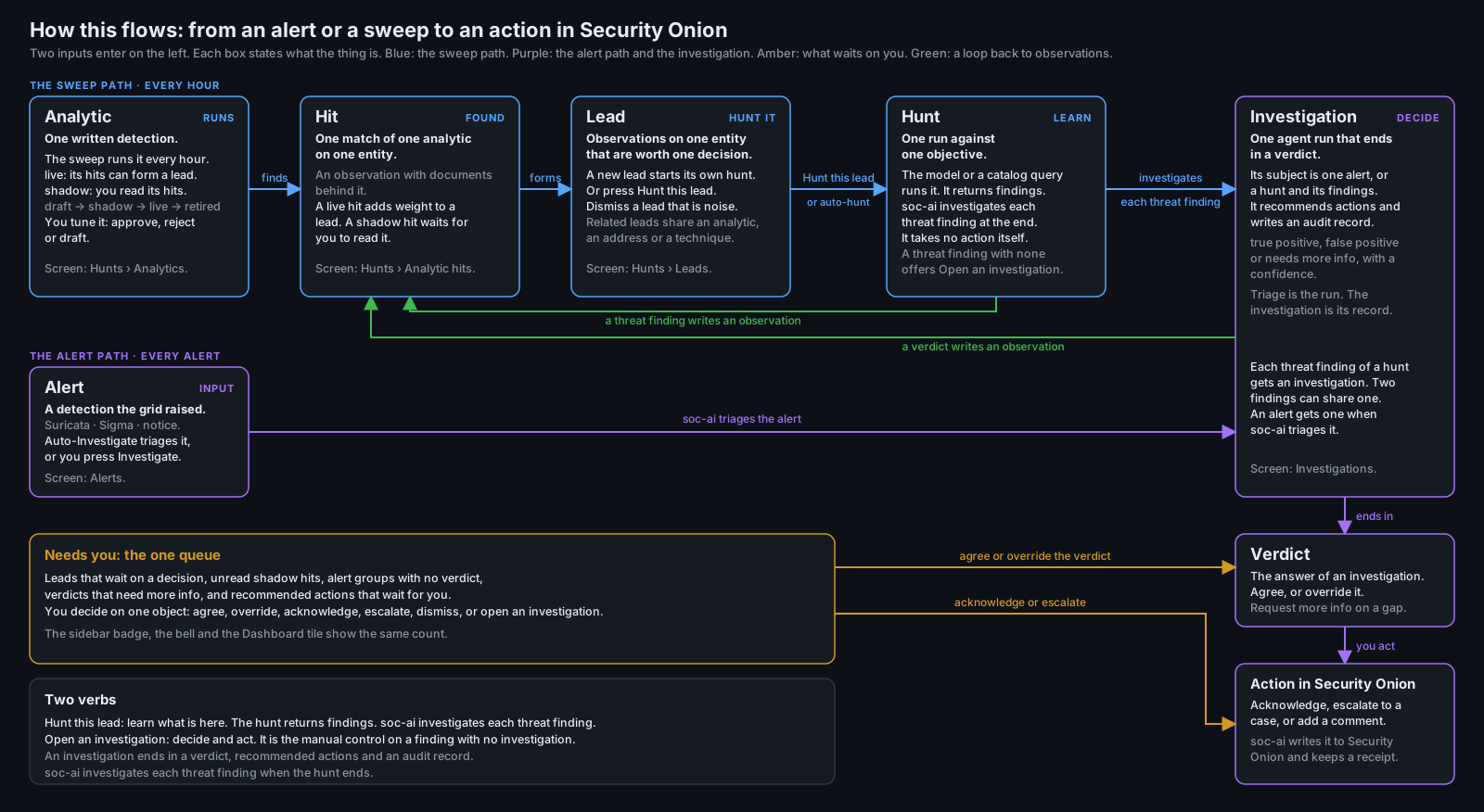
soc-ai also hunts when nobody asks. An analytic runs over the grid and writes a hit. Hits on one entity form a lead. The lead starts its own hunt, and you promote the hunt to an investigation that ends in a verdict.
Safety
You stay in control of every action that changes state.
- Reads run freely. The agent pulls events, context, enrichment and packets without asking. A read changes nothing.
- Writes wait for a human. A write acknowledges an alert, opens a case or
adds a comment. The agent recommends the write and you execute it with a
click. One exception is off until you turn it on. Set
auto_ack_fp_enabled=trueunder Settings → Triage automation. The exception auto-acknowledges a confident false positive. The write needs high confidence, and the investigation must have retrieved something first. It never fires on a critical or high-severity alert, or on a malware-class or exploit-class alert. soc-ai audits every unattended write. - No data leaves your network without your consent. The reasoning runs on your own model and your own hardware. The Oracle is an optional cloud second opinion, and it is off by default. If you turn it on, soc-ai redacts internal hostnames, usernames and IP addresses before it sends anything. Leave it off and the whole pipeline stays on your network.
Self-hosting
Alert triage is the task a security operations centre most wants to give to an LLM. It is also the task where you least want to send your hostnames, usernames and IP addresses to another company's cloud. soc-ai does the triage on your own hardware:
- No cost meter: soc-ai has no per-seat meter, no per-alert meter and no per-investigation meter. No license needs a call home. You run it on your own host.
- Local or air-gapped: the reasoning runs on a model that you host. The Oracle is off by default, so the whole pipeline works with no internet connection.
- Readable reasoning: every verdict cites the events that it rests on. A
true-positive or false-positive verdict needs one of four grounds. The
grounds are a successful tool call, a rule-grounded benign template, a
concrete indicator-of-compromise hit and a cited correlated-pivot record.
soc-ai rewrites any weaker verdict to
needs_more_info. The logic is open, so you can read how soc-ai reached a verdict and then change the logic. - You approve every change. The agent recommends a write and you execute it. The false-positive auto-acknowledge is the one unattended write. It is off by default, bounded and audited. It never fires if the run retrieved nothing.
Architecture
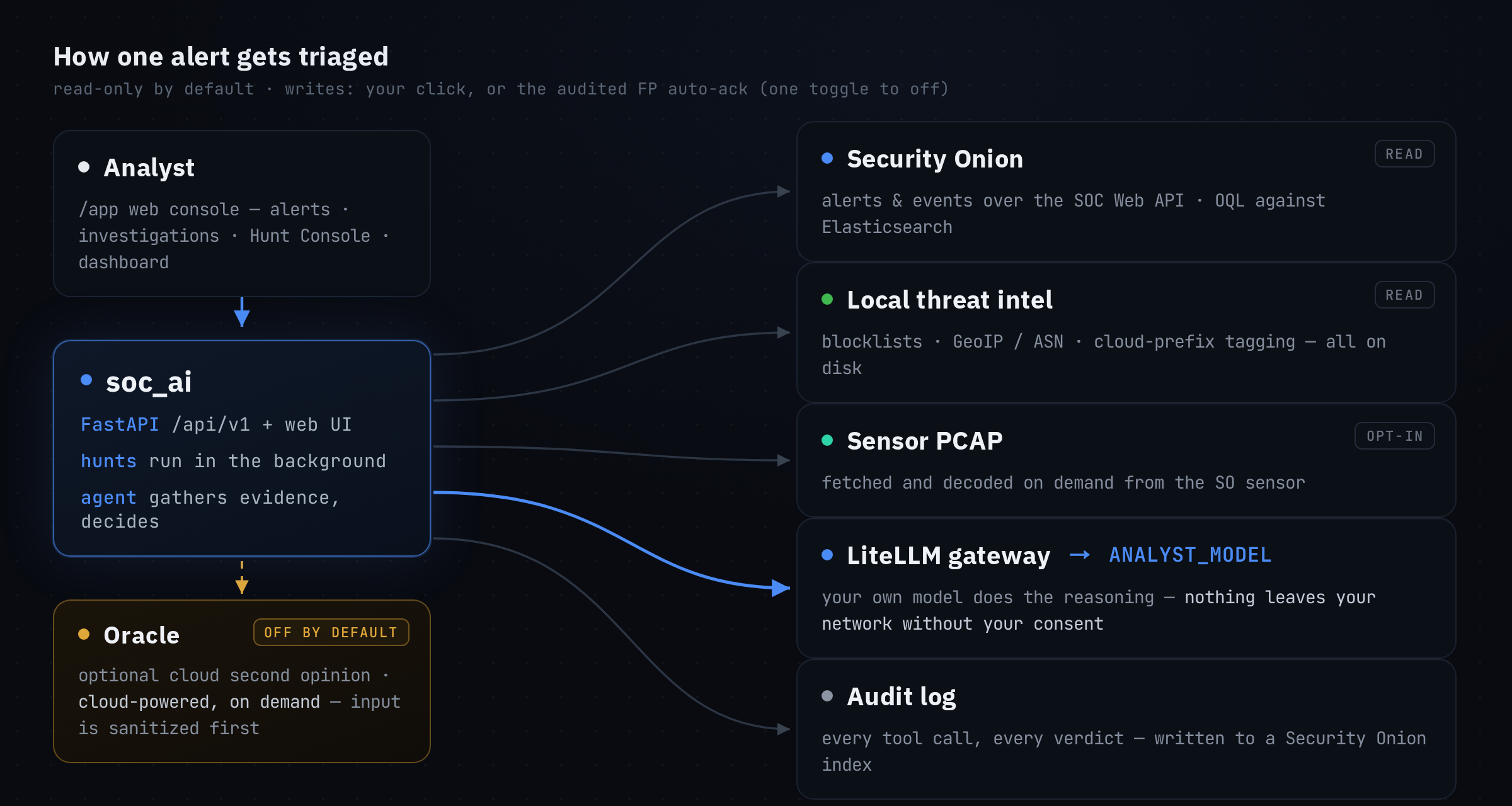
ANALYST_MODEL names the one model that the agent triages with. It is whatever
model your gateway serves. Model IDs drift, so probe /v1/models again to
confirm the ID. The reasoning runs on your host. The Oracle path is the only path
that reaches a cloud API. You opt in to the Oracle, and it reads sanitized input
only.
Installation
-
Quickstart
Clone the repo, run
./setup.sh, and work your first alert in the browser. -
Security Onion setup
The Security Onion account, role and firewall prerequisites. These steps cause the most install problems.
-
Docker deployment
The required mounts, SELinux relabeling, upstream TLS trust, and the port 8443 conflict.
soc-ai is open source under the Apache-2.0 license. If you already run Security Onion, soc-ai runs a local model over your alert queue. The roadmap records what shipped, what comes next, and what ships off by default. Each release has its notes under Project.