soc-ai 1.5.0
1.5.0 is the hunting release, and it is the largest change since 1.0. Every release before it waited for a person. An alert arrived, or you typed an objective. soc-ai now runs its own detection logic over the grid, collects what each run observed, and decides by itself which entities are worth a look. An analytic finds a hit. Hits on one entity form a lead. The lead starts its own hunt. You read the hunt and promote it, and the investigation that follows ends in a verdict with the evidence attached. The release also makes a verdict more accurate, and it restores every write to a Security Onion 3.3 grid.
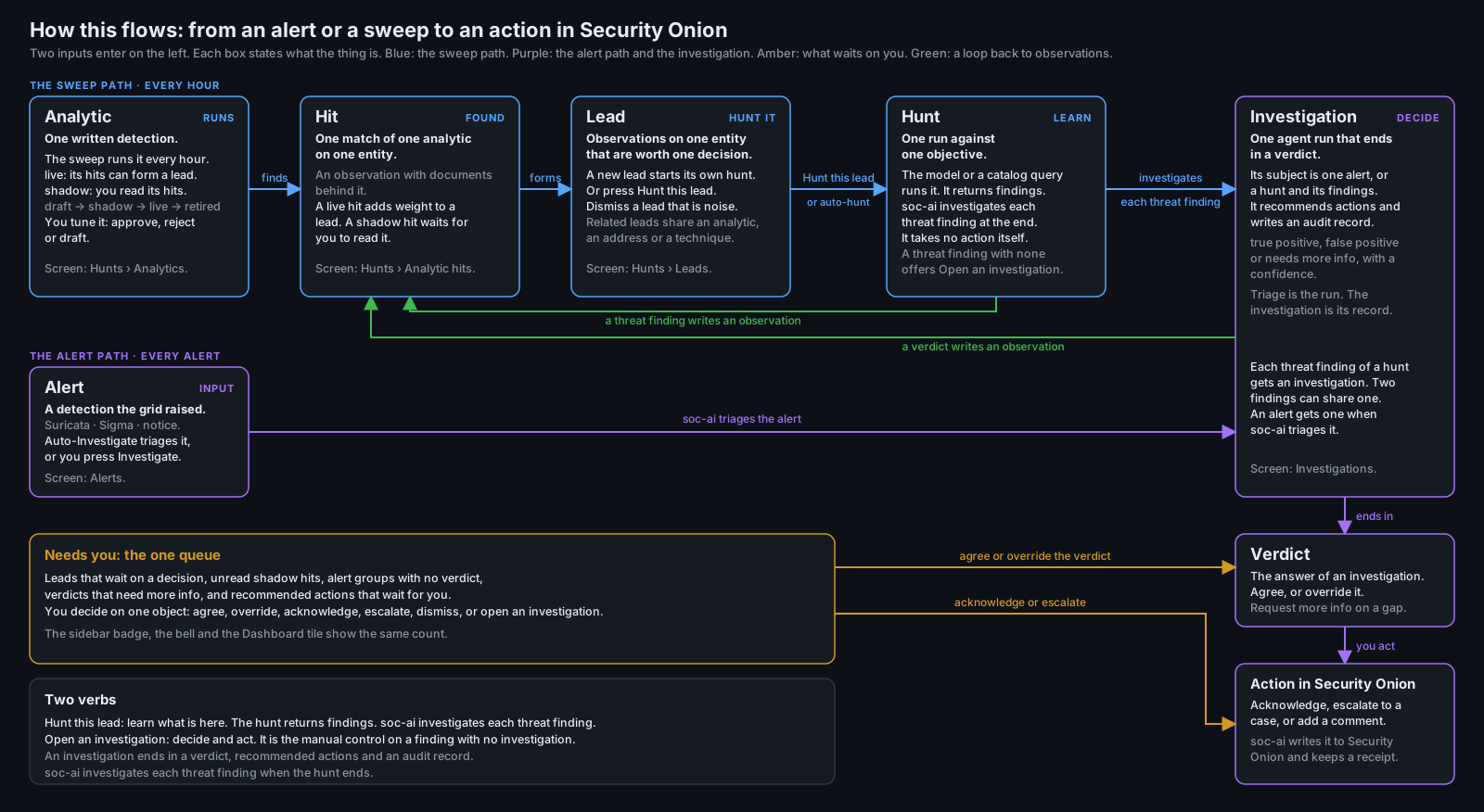
The five nouns
Analytic
An analytic is one detection logic. The catalog holds two tiers. A shipped analytic is a YAML file in the repository. A local analytic is one that you create in the app. Four shipped query analytics cover DCSync, Kerberoasting, AS-REP roasting and decoy interaction. A query analytic compiles to one Elasticsearch query and calls no model. Its findings come from the text of the spec, so nothing generative writes them.
An analytic has four states: candidate, shadow, live and retired. You move a candidate to shadow. You approve a shadow analytic to live. You retire an analytic with a reason. Each transition records the spec text before and after, who acted and why. A shipped analytic can only be retired.
The Analytics tab lists the catalog with a status column and an outcome ledger for each analytic. The ledger counts the observations it wrote and the leads it contributed to. It counts how many of those leads were hunted, promoted or dismissed under each reason. It also counts the documents it scanned and the entities it could not score. Every analytic declares the telemetry it needs. An absent data source becomes a coverage gap in your findings. It never becomes an all-clear.
Hit
A hit is one observation that one analytic wrote about one entity, with the documents behind it. One table holds the observations from every source: a profile departure, a catalog hit, a triaged alert and a promoted hunt finding. An alert verdict writes 1.0 for a true positive and 0.5 for needs more info. A false positive writes nothing. A promoted hunt finding writes 0.7. Each weight decays with a 48 h half-life.
GET /api/v1/hunts/hits lists every hit from the last 7 days. Live hits come first, newest first.
Shadow hits follow, unread first. A live hit carries the visual weight of a real signal. A shadow
hit is provisional, and it brings receipts. The receipts are the matched documents and fields, the
baseline for a profile analytic and a 30-day dry run. They also hold the overlap with any live
analytic that saw the same documents. A hit with incomplete receipts reads "could not run" and names the missing part.
A shadow hit stays unread until you open its evidence or act on it. The card offers Approve analytic, Reject analytic and Mark read. An approval leaves the hit in place. You keep the hit and its read state, and the next sweep records the entity again as a live hit. The catalog sweep records the observation only. It adds no entry to the Hunts list.
Lead
A lead is the observations on one entity that are worth one decision. A lead forms in three ways. The live weight reaches 0.85 across two or more observation types. A finding has no benign baseline. One type repeats to an uncapped weight of 1.5. A lead spans the entities that one hit names. It never merges through a hub. A domain controller sits on many leads, and a merge through it would join the estate into one.
A lead has a status: open, hunting, dismissed with a reason, or promoted. The lead page carries the timeline of its observations. Each entry names the analytic, the summary, the baseline used and the evidence ids, and each id opens the raw document.
The lead page also carries a Related leads panel. A related lead is open, and it formed in the last 7 days. It also shares one of four things with the lead:
- the same analytic within 24 h
- the same alert rule within 24 h
- the same external address or /24 network
- the same ATT&CK technique
Each row states the share in one phrase, names the state of the related lead, and links to it. The lead row carries a "+N related" chip. soc-ai computes the list on read and stores nothing. A stored relation goes stale as soon as you answer either lead.
Hunt
A hunt is one agent run with an objective. An analyst, a schedule or a lead starts it. A lead hunt reads the documents that formed the lead before it queries the grid. Its objective names the lead's observations and the related leads. The objective asks the hunt to state whether the related leads are one campaign, with the evidence.
With lead_auto_hunt on, a loop wakes every 60 s. It starts the hunt for each open lead that has
no hunt, oldest lead first, up to lead_auto_hunt_concurrency at a time. The loop leaves four
leads alone: a dismissed lead, a reopened lead, a shadow lead, and a lead whose observations cite
no documents. Each of those keeps its Hunt button, so you can start the hunt by hand.
A hunt ends in findings and a narrative. It states no verdict. A finding names an entity and cites documents, or it names a gap.
Investigation
An investigation is one agent run that ends in a verdict. Its subject is one alert, or one hunt with all of its findings. Promotion used to start the alert triage on one cited document, so the scope collapsed from the hunt to one event.
A hunt-subject investigation now reads the hunt: the objective, the narrative, every finding and every document those findings cite, up to 40. The promoted finding's documents come first and the rest follow newest first. A lead hunt also carries the lead's observations and its related leads. soc-ai loads the cited documents as evidence before the investigation starts.
The verdict schema does not change. The prompt states what each verdict means for a hunt. A true positive means the hypothesis holds as an attack or a compromise. A false positive means the findings have a benign explanation that the evidence supports. Needs more info names the gap that a tool call can close. The summary answers the objective in one paragraph.
Every gate runs on a hunt subject: the evidence gate, the citation validation and cap, the egress guard, the Oracle escalation and the session gate. Decision templates do not run. Every template matches an alert rule class, and a hunt has none. The unattended acknowledge does not run either. Security Onion holds no hunt to acknowledge.
GET /api/v1/investigations/{id} carries a subject block. The block holds the hunt id, the
objective, the finding ordinals and titles, the lead id, the document ids and the observation ids. A list row
carries subjectType, which reads alert or hunt. Promote on a lead with no finished hunt
answers HTTP 409 lead_not_hunted and names the way forward.
Accuracy and speed
Two measurements drive this release. Both are on record, and both read stored events. Neither comes from a rerun.
A turn audit of 41 investigations, 2026-09-19. It read 35 runs on a production deployment
and 6 runs on an attack range, with the range's ground truth supplied. The 35 production runs were
the 30 newest complete alert investigations and 5 investigations of hunt findings. All 30 production alert verdicts were
correct. The median wall time to done was 73 s. The correct verdict was reachable from the
prefetched context at 2 s, in 29 of the 30 cases. The model first wrote the final verdict at a
median of 17 s. Measured run by run, the median time from that first statement to done was 58 s.
That span held 79% of the wall time and 84% of the tokens, and no turn in it changed a verdict.
An accuracy mission on eleven range alerts with known truth, 2026-09-19. Eight are true positives and three are false positives. Each alert ran three times, or twice on the two hardest, for 31 runs per arm. The arm where the investigation loop writes the report went from 29 of 31 correct to 31 of 31. The arm where a second model call writes the report went from 26 of 31 to 30 of 31. A third round over the seven alerts that had missed or could regress landed 28 of 28, 14 of 14 in each arm.
The accuracy cost time and tokens. These are the medians over the nine-alert set.
| Arm | Time before | Time after | Tokens before | Tokens after |
|---|---|---|---|---|
| The investigation loop writes the report | 55 s | 70 s | 65K | 76K |
| A second model call writes the report | 103 s | 112 s | 87K | 91K |
The extra time buys a tool call that names who drove a host, and a turn that tests its hypothesis against the grid.
Three changes came out of the two measurements.
- The investigation loop writes the report.
investigator_emits_reportis on by default. The second model call added no new evidence in 40 of 41 sampled runs. It cited nothing in 78% of recent production runs, and it reversed two correct range verdicts. On the eleven range alerts this path landed 31 of 31 against 30 of 31, 42 s faster. Every gate still runs on the report on both paths, and the stored report names the call that wrote it. - The first-pass synthesis runs only when it can close the alert. On the production deployment it ran 2,009 times and its answer was discarded 1,661 times. It now runs only when a dispositive decision template has already cleared the alert. That removes about 18 s and 8,000 tokens from each affected run. The verdict does not change. The loop never read the first-pass report.
- A run that stops early reads the evidence it gathered. A tool-call budget cut, and a concluding synthesis that fails, now write the verdict from the tool results that did land. A run that gathered nothing writes a report that states the failure, and it stays retryable.
Security Onion 3.3
Security Onion 3.3 stopped accepting a Kratos API-flow session token in an X-Session-Token header.
The login still succeeded, and the Security Onion console then refused the session on every call
with HTTP 401. Every write failed that way: acknowledge, escalate, case creation and case comments.
Reads were unaffected. They read Elasticsearch with a different credential.
soc-ai now logs in the way the Security Onion web interface does. It reads the login flow document,
submits the credentials with the flow's CSRF token, and then carries the ory_kratos_session cookie
on every later request. The srv-token handling and the Kratos path prefix setting are unchanged.
One build works on every Security Onion release. so_login_flow takes auto, browser or api,
and auto is the default. auto runs the browser flow and falls back to the API flow when the
browser flow cannot complete. A wrong password never causes the fallback. The same password fails
on both flows. soc-ai keeps the flow that worked for the life of the process, so a fallback costs
one extra login. browser and api force one flow with no fallback. The setting applies at the
next restart.
A refused session now backs off. The old behaviour dropped the session and logged in once more on every request, with no ceiling. Over three days that made 32,420 throttled logins and 75,800 warnings in Security Onion. It also grew the audit index to 16 times its normal size. The hold starts at 30 seconds and doubles to a ceiling of 10 minutes.
soc-ai doctor names the cause. On a 401 it now reports that the Security Onion console refused the
session. It sends you to the Security Onion version and the login flow. Its PASS line names the
flow in use. The header status indicator says the same.
Settings that ship on or off
| Setting | Default | What it does |
|---|---|---|
lead_auto_hunt |
on | A lead that has never had a hunt starts one when it forms. |
lead_auto_hunt_concurrency |
2 | How many lead hunts the loop runs at once. |
investigator_emits_report |
on | The investigation loop writes the verdict report. The second model call does not run. |
synth_round1_always |
off | Run the first-pass synthesis even when it cannot close the alert. |
entity_profiles_enabled |
off | The dossier refresh builds a behavioural baseline for each host. The profile sweep reads every host as blind until this is on. Turn it on for the shadow week. |
hunt_spec_sweeps_enabled |
off | Run the analytic catalog on a loop. Turn this on last. |
hunt_spec_sweep_interval_minutes |
60 | Minutes between catalog sweeps. The floor is 5. |
hunt_spec_sweep_window_minutes |
1440 | How far back each sweep looks. |
catalog_hunt_rows |
off | Add an entry to the Hunts list for each analytic hit, as the sweep did before 1.5.0. |
so_login_flow |
auto | Which Kratos login flow soc-ai uses: auto, browser or api. |
lead_auto_hunt, lead_auto_hunt_concurrency and catalog_hunt_rows apply live.
investigator_emits_report and synth_round1_always apply to the next investigation.
so_login_flow applies at the next restart.
Upgrade notes
Turn on "Build behavioural profiles" in Config after the upgrade. The profile sweep runs every hour. It reads every host as blind until the dossier refresh has built a baseline for that host. The first baselines arrive with the next dossier refresh.
- Back up the store first. Run
soc-ai backup, or copy the SQLite file out of the data directory while the app runs. The store holds the investigations, the audit history, the runbooks and the config. - Migrations 0042 to 0050 run at start. They add the entity profiles, the observations and
leads tables, the prior spec runs and the observation sources. They also add the hunt starters
and lead statuses, the analytic tiers, the template analytics and
investigations.subject_json. The last column is empty on every alert run that already exists. Watch the first start, and checksoc-ai doctorafter it. - Read the Needs-you strip. It is the one line at the top of the Hunts page. It counts the unread shadow hits and the leads that wait on a decision, and each link jumps to the block that holds them. The sidebar badge shows the same count. When nothing waits it reads "Nothing needs you".
- Run a shadow week before you approve anything. Leave
hunt_spec_sweeps_enabledoff and runsoc-ai spec-sweep --shadowby hand, or put an analytic into shadow and let the normal sweep reach it. A shadow analytic writes shadow hits and shadow leads. Neither starts a hunt by itself. Read the hits with their receipts for a week. Then approve each analytic whose receipts hold up, and only then turn the sweep loop on. - Read the lead quality report before you move a threshold.
soc-ai leads --reportand the Lead quality block on the Analytics tab print the same table. Per ISO week, it counts the leads formed, hunted, with a threat finding, promoted, and dismissed under each reason. A threshold moves only on a week of data.
Known limits
- There is no campaign object. Related leads name the open leads that may share a story, and a hunt is asked whether they are one campaign. Nothing joins them into one record with one owner and one verdict. That is the follow-on if a week of use shows related leads that are one attack.
- Related leads are computed on read. soc-ai stores no relation, so a hunt objective holds the list as it stood when the hunt started. The objective says so. The panel on the lead page is always current.
- The lead thresholds are not yet validated against a miss. The lead threshold (0.85) and the single-type threshold (1.5) come from arithmetic, and each one records how it was derived. The hub limit (8) was set on an attack range with no derivation on record, and it says so. The quality report exists to measure all three. No number here has been tested against a lead that should have formed and did not.
- A hunt-subject investigation still names its anchor document. The record keeps the first
cited document in
alert_es_id, andGET /investigations/{id}returns it asgroupId. soc-ai now keeps such a run out of the alert's group on every surface. A hunt verdict no longer reads as the alert's verdict. The stored key is unchanged. - The hunting layer has not run on a production deployment. It was built and read against an attack range over six dogfood rounds. A production deployment ran the 1.4.x line with a hotfix through that period.