Quickstart
This page goes from git clone to a verdict on one of your own alerts in about
30 minutes. The one-time Security Onion prerequisites take most of that time.
Try the demo first, because it takes 5 minutes.
0. Demo
The demo takes 5 minutes. It needs no Security Onion grid and no model.
git clone https://github.com/nuk3s/soc-ai.git && cd soc-ai
docker compose -f docker-compose.demo.yml up --build
# → http://127.0.0.1:8080/app/
The demo holds one story on a small estate of 24 machines. Some runs are recordings of soc-ai on a test grid. A script generated the hosts, the leads, the analytics and the rest. Every page of the console shows data. The demo runs the same console that you connect to your grid later. No data leaves the host. The hosted copy is the live demo. It needs no install and no login.
1. Requirements
- A Linux host with
gitandcurl.setup.shinstalls Docker itself if the host needs it. It does so on RHEL, Rocky and Alma 10 too. - Network reach to your Security Onion grid. The host needs the Security Onion web UI and Elasticsearch on TCP 9200. Open a pinhole for the IP address of this host through the Security Onion firewall. See SO prerequisites.
- A model on one of two routes. The installer asks which route you use.
| Route | What it is | Day-1 cost |
|---|---|---|
| Local or self-hosted, the primary route | Any OpenAI-compatible endpoint that you run: a LiteLLM gateway, vLLM or Ollama. If you have no backend, the bundled profile starts one. See Standing one up. | Model download + hardware |
| Cloud API key | OpenRouter or another OpenAI-compatible provider. The installer turns on redacted egress and prints what the provider sees. Redacted egress tokenizes internal IP addresses, hostnames, usernames, MAC addresses and internal-domain emails before anything leaves. The reversal map stays on your host. | An API key. Redacted alert data leaves your network |
# minimal images lack git and curl:
sudo dnf install -y git curl    # RHEL / Rocky / Alma / Fedora
sudo apt install -y git curl    # Debian / Ubuntu
2. Audit grant
The tamper-evident audit log needs an Elasticsearch write grant. The stock
analyst role does not have it. The audit log fails closed. Without the
grant, every acknowledge, escalate and comment aborts and appears to do
nothing. Run one command against your Security Onion manager:
You can run it before the installer or after it. The doctor below reports a missing grant. For the detail, see SO prerequisites.
3. Install
The installer does the following:
- It validates the Security Onion and Elasticsearch credentials before the build. The build takes about 3 minutes.
- It asks whether you run a local model or a cloud model.
- It lets you pick the model. The cloud route offers a curated shortlist. The local route offers the live list from your endpoint.
- It offers day-1 auto-triage. Auto-triage runs every 5 min, it is capped at 25 targets a sweep, and it acts on high-severity alerts and above.
- It offers the 10-runbook starter pack.
- It generates the secrets and a TLS certificate.
- It starts the stack.
- It runs the doctor.
- It prints the URL and the admin password.
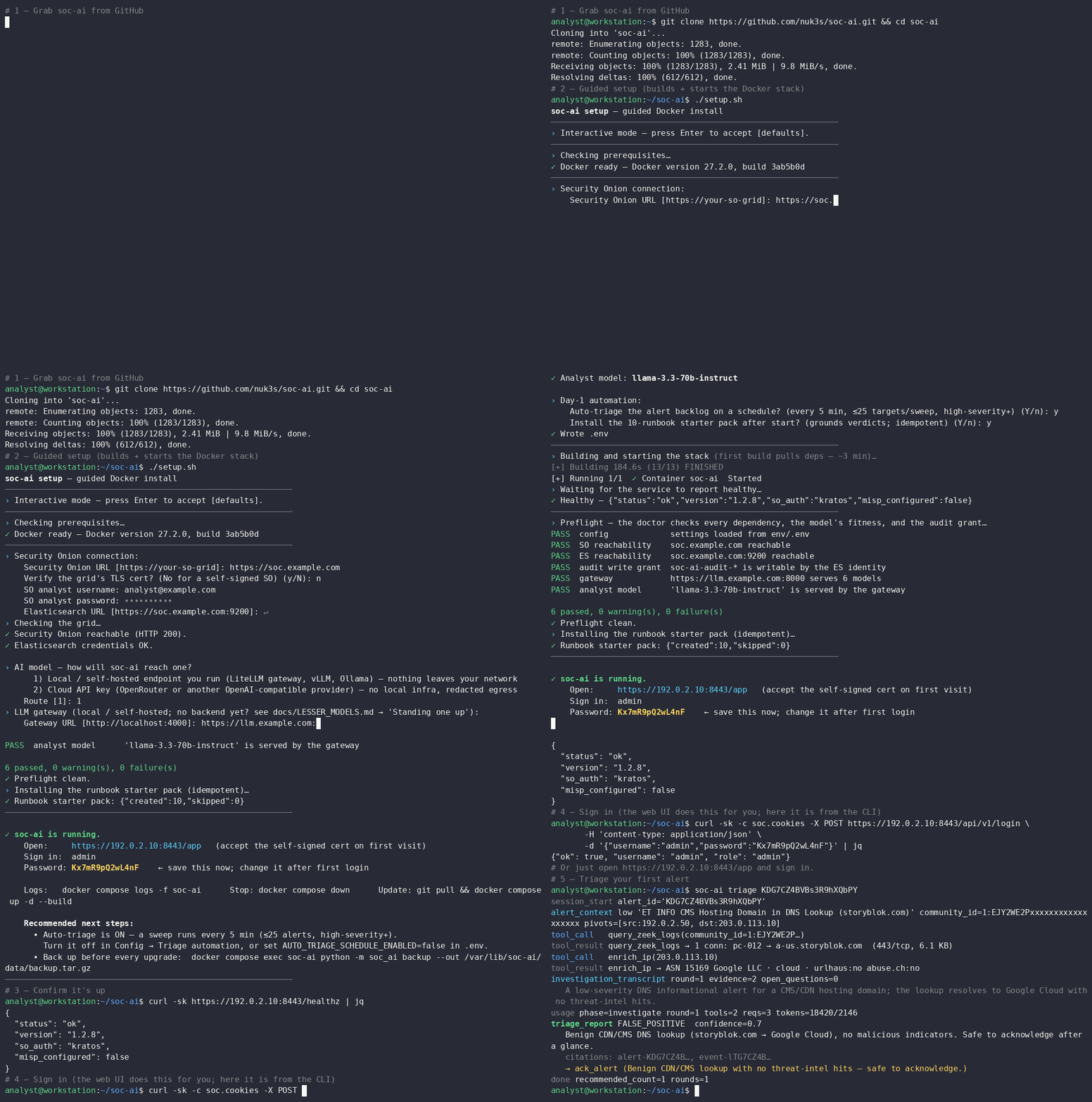
setup.sh builds the image from the Dockerfile in place. To skip the build, run
./setup.sh --prebuilt. It pulls the image from
GHCR, pinned to the
release version. Set SOC_AI_IMAGE_TAG=<x.y.z> to pin another version. The
versions are on the releases page.
If the registry refuses the pull, setup.sh says so. Then it offers to build
from source in the same run.
The doctor prints a pass and fail table over every dependency. It checks the config, the local store and its migrations, and connectivity at the DNS, TCP and TLS layers. It checks Security Onion, the gateway, and the Elasticsearch privileges including the audit grant. It checks the index-pattern coverage and the measured fitness of the model against the triage contract. Every failing line names its fix.
Run the doctor again at any time with
docker exec soc-ai python -m soc_ai doctor. From a source checkout, run
uv run soc-ai doctor.
Unattended installs
Fill in setup.conf once. Then run ./setup.sh --auto on the next host.
4. First alert
- Open
https://<host>:8443/app. - Accept the self-signed certificate.
- Sign in as
adminwith the printed password. - Pick a detection and press Investigate.
The agent then works in front of you. It pulls the alert with its Zeek and PCAP context, enriches the indicators, and writes a verdict that cites its evidence. Each write-back waits for your click. If you turned on auto-triage, auto-triage works through the backlog. Look again after 5 minutes.
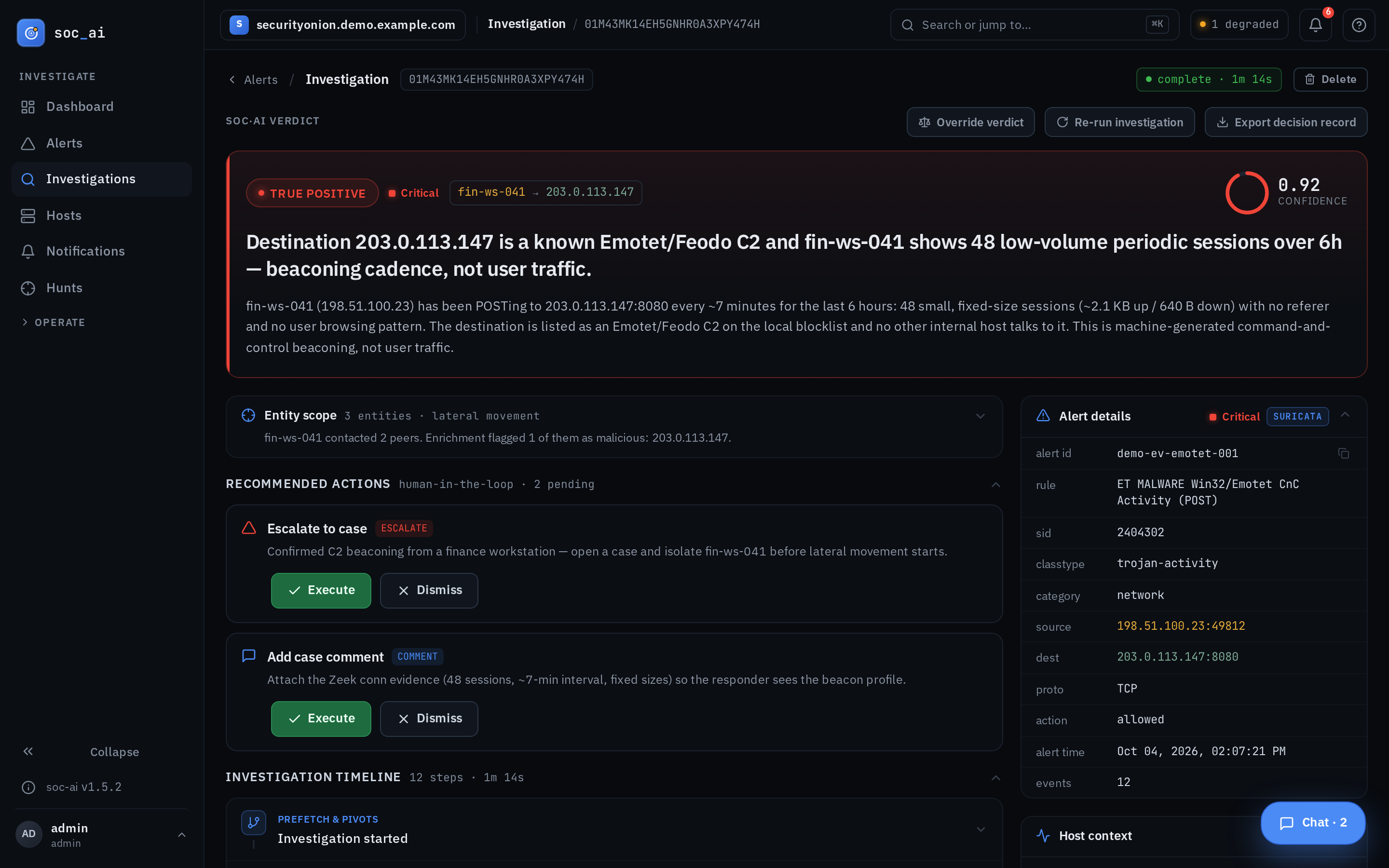
The picture shows an example detection on synthetic data. The real alerts on your grid look the same.
5. Backup
soc-ai backup writes the live store into a portable tar.gz file. The store
holds the investigations, the audit history, the runbooks and the config. The
backup is safe while the app runs. soc-ai restore puts the data back. See
Backup and restore.
Next steps
- Console guide: triage, auto-triage, investigations and config
- Lesser models: how to start a backend, and how to qualify a small or slow model
- Agent tools · Safety model
- Docker deployment: the required mounts, SELinux relabeling, upstream TLS trust through
*_VERIFY_SSL, the port 8443 conflict with the Security Onion nginx, and the manual, rsync and systemd paths - Security Onion setup: the Security Onion account, the role and the firewall